We've been playing around with Kodak's new Theatre HD Player for the past few days, and our feelings are mixed. Kodak is doing a lot of interesting and innovative things here, especially with the gyroscopic Pointer Remote it has included for interfacing with the box, but we're not convinced this thing is polished or helpful enough to justify the $299 asking price. Check out our full impressions after the break.
Hardware
This is where Kodak really shines. The box is small, sexy, and ridiculously easy to set up -- with your choice of component or HDMI in the back, optical or RCA audio, and not even a silly "power button" to mess with.
But, of course, most of these set-top boxes are pretty simple. What really gets us is the gyro-based "Pointer Remote" (Update: built by Hillcrest Labs, thanks macclient!). To say the thing Just Works is an understatement, we really never expected to have a wireless (RF, no line of sight required), surfaceless mousing experience this effortless. There's no need to sync the mouse to the box, you just pop in the batteries and go. There's no calibration needed either, you pretty much just bend your wrist in the way you think you ought to, and the cursor goes exactly where you want it to go -- if it gets off track a bit of jiggling, leaning it to one side, or clicking the "hide cursor" button makes everything right again.
You would think the Wiimote, with its sensor bar-based frame of reference would be better at operating an onscreen pointer, but the Power Remote blows it away -- we were able to type on the onscreen keyboard at about two or three times the speed with the Pointer Remote, pretty dang great for what at the end of the day is a fairly basic set-top box.
There's Ethernet and WiFi, and we went with the latter, which hooked up without a problem, though Kodak recommends you go the wired route for serious usage -- we're rebels like that.
Software
Kodak has a lot of really good and interesting (and attractive) stuff on the software side, but unfortunately they don't seem to have quite sealed the deal -- there are enough annoyances, hang-ups and missing features to make the box, which at the end of the day is built to turn your TV into a glorified digital picture frame, hard to recommend at its $299 pricepoint.
Set-up is a breeze, with desktop side Kodak EasyShare digital display software (also used to manage Kodak wireless picture frames) that automagically seeks out media. Unfortunately it's rather indiscriminate. For instance, it was happy to tell the Theatre HD box all about our iTunes Movie Store purchases, which the box failed miserably at playing -- after taking ages to load, buffer and then actually play a black screen with occasional "glitchy" noises. Also, it builds previews for certain file types, but not for others -- it's a bit of a crap shoot. Overall we'd say we're very pleased with how easy it is to track down our computer's media, but at the end of the day the software and / or the set-top box need to do a better job of making sense of all that data.
(Codec support is super extensive, other than the aforementioned lack of iTunes Movies and a failure to track down our Zune tracks. Most everything else on our hard drive played without a hitch, including full HD 1080p 30fps video).
Online set-up is similarly easy, but with better results: we put in our YouTube and Flickr logins and we were looking at our respective contacts and subscriptions in no time, and they seem to be logically presented. Flickr surfing was much more responsive than YouTube, however, which seemed to have trouble buffering videos and even just pulling up various menus and pages. The interfaces for both are super slick, but we're not sure where the speed bottleneck is coming from.
There's also what we would call "non-native" support for a myriad of services like Facebook, RSS feeds and Weather through Kodak's FrameChannel partnership. FrameChannel works with lazy photoframe manufacturers to package RSS feeds and the like as images that can then be streamed to the device, complete with oversized and incredibly annoying advertisements. Given the fact that coding an RSS app is practically a "Hello World" exercise these days, it's extremely disappointing that Kodak didn't do that itself.
Actually using all this stuff in the living room, Pointer Remote in hand, is a combination of incredible intuitiveness and occasional frustration. Kodak has a fairly simple menu structure, with a lot of sub categories underneath, and persistent shortcuts to music, help, settings and home. The animations to drill through the menus are smooth, but every action seems to bring with it a slightly annoying delay -- you can't blaze through anything. The good news is that you never feel like you're thumbing through an unending list of options, thanks to the quick, precise pointer movements and the familiar scroll wheel. The back button on the Remote quickly gets us out of our rabbit trails, but we still found the deep folder structures a bit overwhelming at times. The player also had a nasty habit of not showing a picture on the first try. We'd click a pic, get a buffering icon, and then get blackness. We had to back out and click again before we actually saw the image -- this happened both online and on locally-stored images.
The most basic functionality of the box -- popping in a memory card, skimming through the pictures, and building slideshows out of it -- works as effortlessly as you would think, but unfortunately the only online upload option the entire device offers is Kodak Gallery. Newsflash: we don't use Kodak Gallery, and we don't know anyone that does. We're sure that these strange creatures exist, but until they represent a majority of the population, we'd really appreciate being able to upload content to Flickr, YouTube, Facebook and so forth.
Wrap-up
We'd say the main problem here is that Kodak hasn't quite managed to make a product easy enough to use that we could recommend to the people who would actually get the most use out of it: our parents. There were enough breaks in the usability and layers of complication to make it too frustrating to the basic user -- for instance, the box found our PC automatically, but once that PC feel asleep and was reawoken, Theatre HD couldn't find the PC's content until we manually re-added it in the settings menu. On the flip side, there's not enough power or capability here to appeal to the power user -- especially with devices like media extenders and the Xbox 360, PlayStation 3 and Wii offering most of these features (or more) for less cost. Add in some Netflix, Flickr and YouTube uploads and patch up some of these usability problems and then maybe we'll talk.
The good news is that Kodak has a wonderful box and a wonderful input mechanism on its hands, and if it's willing to put in the work and capital to build a truly great piece of 2.0 software for it, we might have something here that's worth the $299 asking price. Oh, and let use the Pointer Remote with our computers... pretty please?
[Via: Engadget ]
Kodak's Theatre HD Player with gyro-based Pointer Remote unboxed and reviewed


RED brings the trademark pain against LG's Scarlet HDTV
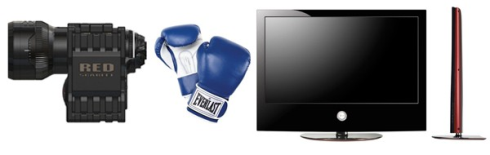
You wouldn't think that anyone in the market for a $3,000 handheld camera capable of shooting 3K HD at 100MB/s would somehow get confused enough to end up with a medicore LG plasma TV, but it seems like the folks at RED are worried -- the company's lawyers are preparing an opposition to LG's filing for the "Scarlet" trademark, and they've filed for their own mark. It looks like RED is getting pretty serious about protecting its marks -- president Jim Jannard is politely asking RED fans to include a trademark disclaimer when they post about the company's products, and he says that the proceedings against LG are "just the tip of the iceberg." Honestly, we think RED's going to have a tough time selling a judge on the likelihood of confusion between a consumer-oriented HDTV and a decidedly pro-grade camera, but we've been surprised in the past -- we'll see how this one plays out.
[Via: Engadget ]
[Tag: jim jannard,JimJannard,lawsuit,legal,lg,red,scarlet,trademark ]
Kodak's new Zi6 HD pocket video camera for the YouTube set
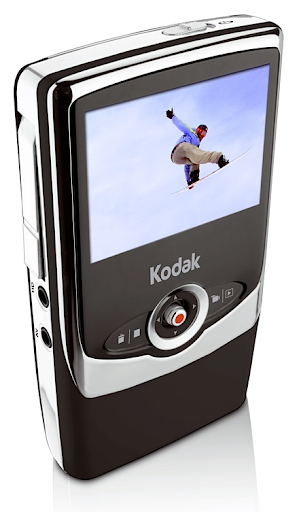
Sure, it might shoot 720p video, but you aren't gonna catch indie filmmakers capturing the next low-budget masterpiece on Kodak's new Zi6 HD pocket video camera. The camera is Kodak's response to Pure Digital's Flip and Creative's Vado, complete with upright form factor, YouTube friendliness, simple as could be interface, a flip-out USB plug (with some surprising spring action), and, of course, totally shoddy video quality. The camera is powered by a pair of AA batteries, sports a 2.4-inch LCD, and can switch between VGA video, 30fps HD and 60fps HD. It'll sell for $180 in September, in black or pink, but there's only 128MB of memory on board -- you'll have to spring for an SD card if you want to do any substantial shooting.
[Via: Engadget ]
[Tag: creative,flip,flip mino,FlipMino,hd,kodak,pocket video cam,PocketVideoCam,pure digital,PureDigital,vado,zi6 ]
Hands-on with Kodak's latest and greatest
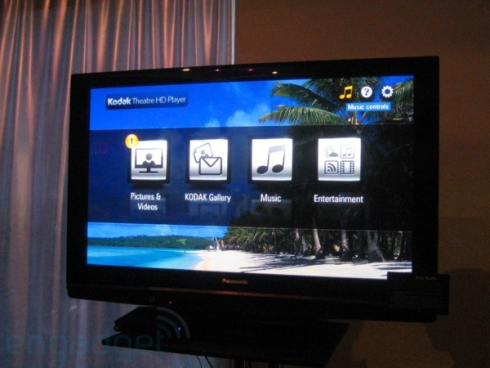
We got a nice look at Kodak's newest gear from this morning, and while it's an uneven showing at best, there are certainly some gems. The real standout of the bunch is the Kodak Theatre HD Player, a teensy box with all the right ins and outs, a purtiful interface, and a glorious motion-sensing remote. We really haven't had this much fun with a peripheral since the Wiimote came along, and Kodak has somehow managed to best that in the role of couch-based cursor positioning. Kodak was a bit coy about what exactly goes on inside the thing, and we're even more curious as to whether somebody can produce a dongle to let it operate a PC, but it's a marvel all the same. Next up -- in importance, anyways -- is Kodak's new Zi6 HD pocket video camera, a transparent bid to cut in on those Pure Digital dollars. It's a bit of a bulky beast, and the image quality is hardly an improvement over the competition, but it certainly works as advertised: it really couldn't be simpler to turn it on, shoot a video, and upload that video to the internet. Perhaps our biggest gripe is that it looks like it was built by some second-tier consumer electronics company, and shares zero design language with Kodak's other products -- many of which have really matured in the looks department of late. The Z1015 IS we didn't spend as much time with, but it seemed nice, light but not too light, and has a gorgeous screen. Finally, the new W820 and W1020 wireless photo frames were on display, with some prototype software showing off some add-ridden FrameChannel content (seriously Kodak, what were you thinking?) but loved just about everything else on the frames.
[Via: Engadget ]
[Tag: features,hands-on,kodak,kodak theatre hd player,KodakTheatreHdPlayer,w1020,w820,z1015is,zi6 ]
DXG-569V HD camcorder available for $169
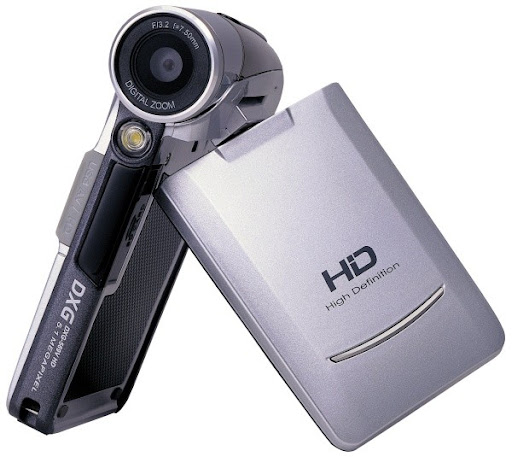 While DXG has few aspirations to taste or quality, they sure know how to price this stuff. The new DXG-569V HD cam can shoot 1280 x 720 video at 30 fps, captures 5 megapixel stills and sports a 3-inch foldout LCD, all for the bargain basement price of $169. Naturally, that video quality probably won't be putting RED ONE out of a job, and you'll need to supply your own SD card to make the magic happen, but if that doesn't dissuade you, you can swipe one from a Radio Shack shelf in silver or black as of today.
[Via: Engadget ]
[Tag: camcorder, dxg, dxg-569v hd, Dxg-569vHd, hd ]
Canon VIXIA HF11 model name turns up, imaginations run wild
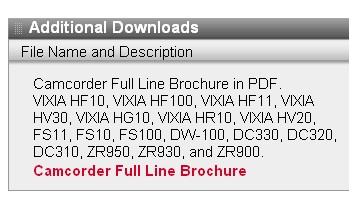
Believe it or not, HF11 actually wasn't one of the many units Canon introduced at CES, but curiously enough, that moniker is showing up on the outfit's own website. When taking a peek at the Drivers & Downloads section for the DC320 DVD camcorder, you'll find a link for a PDF brochure of the VIXIA family that supposedly includes the HF11. Upon opening said file, however, you'll discover nary a mention of the mysterious item. A new model waiting just around the bend? A simple typo? A devilish trick played by the suits at Canon? The world may never know.
[Thanks, Dan]
[Via: Engadget ]
[Tag: camcorder, canon, dual flash, dual-flash, DualFlash, hd camcorder, HdCamcorder, hf11, sd camcorder, SdCamcorder, vixia, vixia hf11, VixiaHf11 ]
